AI Adoption for SMBs / SMEs in Ireland and the UK: A Practical Guide to Getting Started in 2026
Download the AI Adoption Framework
Get the full PDF with checklists, templates, and the three-tier roadmap to roll out AI in your business.
TL;DR
- 75% of SMBs are experimenting with AI, but only 5% reach full deployment. The gap is operations, not awareness.
- Start with what you already pay for. Google Workspace, Microsoft 365, HubSpot, ClickUp, and Xero all have AI features most teams haven't switched on.
- Prompting is the highest-ROI skill for any team in 2026. One 60-minute session gets most teams productive.
- AI agents are the next step: autonomous tools that handle repeatable tasks like inbox triage, invoice chasing, and weekly reporting.
- Follow a three-tier framework: Quick Wins (Week 1) → Process Automation (Weeks 2–6) → AI Agents (Ongoing).
- Fix your foundations first. AI won't fix disconnected tools and undocumented processes. Work on optimising your business processes first before exploring AI.
Intro
Most small and mid-sized businesses (SMBs or SMEs) know AI matters. The problem isn't awareness, it's that nobody knows where to start.
According to Salesforce's 2025 SMB Trends report, 75% of SMBs globally are experimenting with AI. Closer to home, Ireland's Central Statistics Office (CSO) reported that only 20% of Irish businesses used AI in 2025, and for small businesses the figure was even lower at 17%. In the UK, the government's AI activity survey found that just 15% of businesses had adopted at least one AI technology in 2024.
The pattern is the same everywhere where interest is high, but adoption is low. Most businesses get stuck at "someone on the team uses ChatGPT sometimes." No structure, no strategy, no measurable results.
That's not an AI problem. That's an operations problem.
We put together a practical AI adoption framework specifically for SMB owners and leaders. Not a whitepaper full of theory, but a step-by-step guide covering what to do first, what to skip, and how to get results without being overwhelmed.
This post covers the key ideas. If you want the full 12-page framework, you can download it for free here.
How AI-Ready Is Your Business?
Most businesses haven't taken a step back to evaluate where they stand. Here's a quick self-assessment. Score each statement from 1 (not true at all) to 5 (fully true):
| Statement | Score |
|---|---|
| Our core processes are documented, standardised, and followed consistently by the team | 1–5 |
| Our software tools are connected and data flows between them without manual effort | 1–5 |
| We have identified and reduced repetitive tasks that follow similar patterns | 1–5 |
| AI features in our existing tools (Google Workspace, Microsoft 365, CRM, accounting) are switched on and actively used | 1–5 |
| Our team knows how to write effective prompts and gets consistently good outputs from AI | 1–5 |
| AI is used to produce first drafts of proposals, reports, presentations, or other business documents | 1–5 |
| We have explored or started using AI agents or automations that run tasks without human involvement | 1–5 |
7–14: Foundation Stage. Your business is running on manual effort and disconnected tools. AI won't deliver value until the basics are in place, and that's where the biggest quick wins are.
15–24: Getting Started. Some of the building blocks are there but there's no structured approach. Most SMBs are here.
25–35: AI-Forward. You're ahead of most businesses your size. The next step is moving from individual AI use to a fully integrated operating model.
Why Most SMBs in Ireland and the UK Are Stuck
The data tells a clear story. Microsoft's 2025 Work Trend Index found that teams who have built AI into their daily operations are saving 10+ hours per week. But only 5% of businesses that pilot AI tools reach full deployment, according to OpenAI's 2025 State of Enterprise AI report. The rest never move past experimentation.
What we see working with businesses across Ireland, the UK, and the US is the same pattern. Someone on the team starts using ChatGPT for ad hoc tasks. Maybe they draft a few emails or summarise a document, but it stays at the individual level and there's no structured approach, no shared prompts, no integration with how the business actually operates.
The result is a team where one or two people get value from AI and everyone else assumes it's not that useful.
For Irish and UK SMBs specifically, there's an additional factor. Many are running lean teams where the owner or managing director is involved in day-to-day operations. There's no dedicated IT team to evaluate AI tools and no innovation budget to experiment with. The business needs practical, low-risk ways to adopt AI that don't require pulling people off client work.
This is a common challenge for professional services firms, agencies, B2B companies and growing businesses across the UK and Ireland that know they need to move on AI but can't decide where to start, and can't risk getting it wrong.
What Is an AI Adoption Framework?
An AI adoption framework is a structured approach to implementing AI across a business. Rather than experimenting with random tools, a framework gives you a clear path: what to do first, what to do next, and what to build towards over time.
A good AI adoption framework for SMBs should cover:
- Which AI features are already built into tools the business pays for
- How to train teams on effective AI prompting
- Which specific business tasks AI can handle today
- When and how to introduce AI agents and workflow automation
- How to measure results and expand usage over time
The framework we developed at Synix follows a three-tier model: quick wins, process automation, and AI agents. Each tier builds on the one before it, so businesses can start seeing results within a few weeks and build from there.
Most Businesses Are Already Paying for AI They're Not Using
This is the quickest win most SMBs in Ireland and the UK overlook, and it's the first tier of any AI adoption strategy.
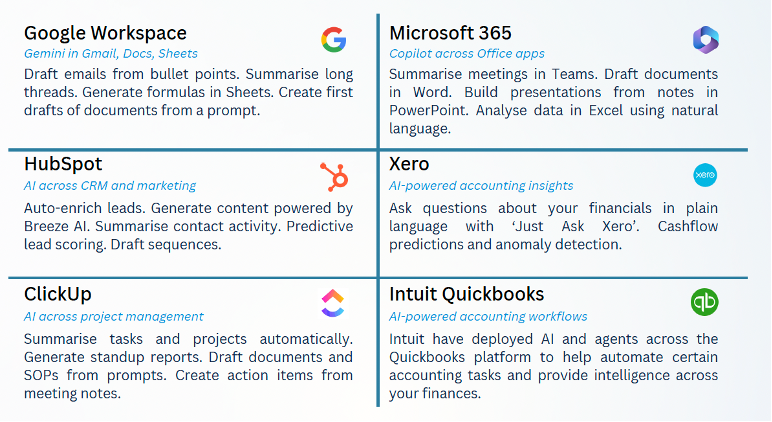
If your business runs on Google Workspace, Microsoft 365, HubSpot, ClickUp, Xero, or QuickBooks, you're already paying for AI features that were added in the last 12 to 18 months. Most teams haven't switched them on.
Google Workspace with Gemini can draft emails from bullet points, generate formulas in Sheets, and create first drafts of documents from a prompt. Available on Business Standard plans and above.
Microsoft 365 with Copilot can summarise meetings in Teams, draft documents in Word, build presentations from notes in PowerPoint, and analyse data in Excel using plain language.
HubSpot with Breeze AI auto-enriches leads, auto-prospects, summarises contact activity, and provides predictive lead scoring.
Xero lets you ask questions about your financials in plain language with "Just Ask Xero" and provides cashflow predictions and anomaly detection. Xero is widely used by Irish and UK businesses and their accountants.
Intuit QuickBooks has deployed AI and agents across its platform to automate accounting tasks and provide intelligence across your finances.
ClickUp AI summarises tasks and projects, generates standup reports, drafts documents and SOPs from prompts, and creates action items from meeting notes.
Before buying any new software, audit what you already have. A company running Google Workspace with Gemini turned on across the team will get more value than a company paying for five AI tools that nobody logs into.
AI Prompting: The Highest-ROI Skill for SMBs in 2026
Most people type a sentence into ChatGPT, get a mediocre response, and assume AI isn't that useful. The problem isn't the tool, it's the input.
The difference between a vague prompt and a structured one is the difference between a 20-minute rewrite and a copy-paste.
A vague prompt: "Summarise our Q4 results."
A structured prompt: "Act as our CFO. I've attached our Q3 and Q4 P&L statements. Analyse both and produce a quarter-on-quarter comparison highlighting revenue growth, gross margin movement, and any cost lines up more than 10%. Present key metrics in a table, then write a 200-word management summary. Tone: factual and professional."
The second prompt takes 60 seconds longer to write. The output takes 60 minutes less to fix.
How to Write Effective AI Prompts
Effective AI prompting follows a simple structure. We use the CLEAR framework:
- Context: Give the AI the background it needs before asking anything. Think of it like briefing a smart new hire.
- Length: Tell it exactly how long or what format you want. A table, a 200-word summary, a numbered checklist. Be specific or you'll get something generic.
- Example: Show it what good looks like. Even one sentence of example tone or format will dramatically improve consistency.
- Action: State clearly what you want it to do. Not "help me with this" but a precise instruction like analyse, rewrite, compare, draft, or summarise.
- Role: Tell it who to be. "Act as our CFO" or "work as our operations manager" primes the AI to respond with the right expertise and perspective.
A single 60-minute session on prompting fundamentals gets most teams productive. This applies to emails, proposals, reports, documentation, job descriptions, and anything else your team writes regularly. This is true whether you're using ChatGPT, Claude, Gemini, or any other AI tool.
Where AI Saves Real Time for Small Businesses
Beyond the basics, there are specific tasks in every business where AI delivers immediate time savings. They're tasks that SMBs across Ireland and the UK are doing right now, with AI handling the first 70% to 90% and humans reviewing the rest.
Writing Proposals and Quotes
Most businesses spend 2 to 3 hours drafting proposals from scratch, pulling in past pricing, and copying from old documents. Instead, try feeding your pricing, past proposals, and the client brief into Claude or ChatGPT and you will have a first draft in 10 minutes which you then review, adjust, and send. That's roughly a 70% time saving on every proposal.
Call Summaries and Follow-Ups
Someone takes notes during a meeting, types them up afterwards, and sends a summary the next day. Instead, record the meeting with a tool like Fireflies.ai to auto-transcribe, and use AI to extract action items and draft a follow-up email immediately. That's 90% of the manual work gone.
Responding to RFPs and Tenders
Days spent pulling together compliance documents, rewriting capability statements, and tailoring responses to each section. Instead try feeding the RFP requirements and your previous submissions into Claude or ChatGPT and they will draft section-by-section responses matched to the criteria which you then review and tailor as needed. That's a 60% time saving.
Creating Client Documents and Presentations
Give AI your key points, data, and brand guidelines. Use Canva with Magic Studio or feed the brief into ChatGPT or Claude to get a structured first draft you can refine in under an hour instead of spending half a day building from scratch.
Writing Job Descriptions and Internal Documentation
Give AI your role requirements and company context. Get a tailored job description, policy document, or handbook section drafted in minutes, and you then refine the detail. That's an 80% time saving.
The time savings compound across every person in the team who does these tasks. For a 20-person professional services firm in Dublin or London, that could be hundreds of hours recovered per quarter.
What Are AI Agents and How Can SMBs Use Them?
Everything above is about you working with AI where you ask, it helps, you review. AI agents are the next step.
An AI agent is a digital co-worker. You give it a job, connect it to your business tools, and it runs on its own in the background without you needing to be involved. AI agents can be initiated manually, triggered by specific events, or run fully autonomously 24/7.
Examples of AI Agents for Small Businesses
Inbox triage agent: Sorts incoming email by urgency, drafts replies to routine messages, and flags what needs human attention.
Invoice chasing agent: Monitors overdue invoices, sends follow-up emails at set intervals, and escalates when needed. Particularly useful for Irish and UK businesses managing cash flow across multiple clients.
Weekly reporting agent: Pulls data from your CRM, finance tools, and project management software into a one-page business summary every Monday morning. No manual compiling.
Meeting prep agent: Pulls attendee info, CRM history, and open proposals into a one-page brief before every call.
Client onboarding agent: Sends welcome documents, schedules kick-off meetings, and sets up the client in your CRM and project tools once contracts are signed.
We're still in the early days of agent adoption for SMBs, but the direction is clear. Teams will operate as a mix of humans and agents working side by side. For small businesses in Ireland and the UK, this matters because capacity has always been the core growth constraint. When you can deploy agents to handle the repeatable work, your team focuses on the work that requires human judgement.
The Best AI Tools for Small Businesses in 2026
One of the most common questions we get from SMB owners is "which AI tools should I actually be using?". Here's a breakdown of the tools we recommend by category, based on what we see working for businesses with 10 to 200 employees.
General AI Assistants
ChatGPT by OpenAI: The most widely used AI assistant. Strong for drafting content, brainstorming, summarising documents, and general business tasks. Available as a free tier or Plus plan at $20 per user per month. The Pro plan at $200 per month gives access to the most capable models.
Claude by Anthropic: Our preferred tool for longer, more nuanced work. Claude handles complex documents, detailed analysis, and extended conversations better than most alternatives. Excels at proposals, reports, and strategic thinking. Available from $20 per user per month on the Pro plan, or $30 per user per month on the Team plan with collaboration features.
Gemini by Google: Built into Google Workspace, which makes it the natural choice for businesses already on Google. Summarises Gmail threads, drafts documents in Docs, and generates formulas in Sheets. The deep integration with Google's ecosystem is its biggest advantage.
Microsoft Copilot: The equivalent for Microsoft 365 users. Summarises Teams meetings, drafts in Word, builds presentations in PowerPoint, and analyses data in Excel. If your business runs on Microsoft, Copilot is the path of least resistance.
Meeting Transcription and Summaries
Fireflies.ai: Records and transcribes meetings across Zoom, Teams, and Google Meet. Automatically generates summaries, action items, and searchable transcripts. From $10 per user per month.
ClickUp: Built-in call recorder that works within your ClickUp workspace so it auto-creates tasks and documents after calls. Included with other ClickUp plans.
Attio: A super powerful AI-first CRM that has a call recorder included in premium plans. It auto-summarises, creates tasks and logs all calls and details to the right record making it easy to find and search across your CRM. From $70 per user per month.
Workflow Automation and AI Agents
Zapier: Connects over 7,000 apps and lets you build automated workflows without code. If you need data to flow between your CRM, project management tool, accounting software, and email, Zapier is the most established option. Free tier available, paid plans from $20 per month.
Make (formerly Integromat): Similar to Zapier but with more complex workflow capabilities and visual workflow building. Preferred by teams who need more sophisticated automation logic. Free tier available, paid plans from $9 per month.
Lindy: Purpose-built for creating AI agents. Lets you build agents that triage emails, schedule meetings, do research, and handle repetitive tasks autonomously and it is more accessible than building agents from scratch. From $50 per month.
Building Internal Tools
Lovable: An AI-powered tool that lets you describe what you want and builds a working web application. We've seen SMBs use it to build project profitability dashboards, client portals, and internal reporting tools in days rather than months. No development experience required.
Design and Content Creation
Canva with Magic Studio: Generates images, removes backgrounds, resizes designs for every platform, and creates presentations from text prompts. Many SMBs already have Canva and aren't using its AI features.
You don't need all of these. Most businesses should start with the AI features in tools they already pay for, add one general AI assistant (ChatGPT or Claude), and introduce workflow automation (Zapier or Make) when they're ready for Tier 2. That's enough to see significant results.
The AI-First Operating Model
The businesses seeing the biggest impact from AI aren't just using it for individual tasks. They've changed how they think about work entirely.
Every time they face a new challenge or find themselves repeating the same task, the first question is: "Can AI do this, or can it get us 80% of the way there?"
That's the real shift, from AI as something you occasionally open, to AI as the first place you go. That's what turns a collection of tools into an operating system.
A team that thinks this way will use AI to build an internal project profitability tool with Lovable instead of living with messy spreadsheets. They'll use Claude to run competitor analysis and model pricing for a new service offering in a single sitting instead of weeks of meetings. They'll connect Claude to their CRM and feed it call transcripts to get a structured breakdown of why they lost deals last quarter instead of relying on anecdotal feedback from the sales team.
This isn't about one tool or one platform, it's about a way of operating where AI sits across your business, and your team still makes the decisions, still owns the quality, and still drives the strategy. But the starting point for almost everything changes.
A Three-Tier AI Adoption Framework
The biggest mistake businesses make with AI is trying to do everything at once. The second biggest is doing nothing because they don't know where to begin. Here is a simple three-tier framework that any SMB can follow.
Tier 1: Quick Wins (Week 1)
- Enable AI features in tools you already pay for: Google Workspace, Microsoft 365, HubSpot, ClickUp, Xero
- Train your team on prompting basics, one 60-minute session gets most teams productive
- Pick one repetitive writing task and move it to AI, such as email drafts, meeting summaries, or status reports
Most businesses can get through this in a week and start seeing results quickly.
Tier 2: Process-Level Automation (Weeks 2–6)
- Identify your three most time-consuming manual processes, often client onboarding, reporting, and client communications
- Map out which steps can be handled by AI, not everything needs to be automated, just the repetitive parts
- Connect your tools with workflow automation using Zapier or Make to link your systems together and enable data to flow
Tier 3: AI Agents and Strategic Deployment (Ongoing)
- Build agents for specific, repeatable jobs using tools like Lindy, Zapier, or Make, inbox triage, onboarding checklists, invoice follow-ups
- Create an internal AI playbook for your team with standard prompts, approved tools, and guidelines
- Review the impact quarterly and look to expand, measure hours saved, quality improvements, and cost reduction
Fix the Foundations First
Here's the part most people skip: none of this works if your business operations are a mess. If your team is running on unstructured processes, disconnected tools, and data scattered across platforms, AI won't fix that. It'll automate the chaos.
This is especially common in fast-growing Irish and UK SMBs where the tech stack has grown faster than the processes around it. Fix the foundations first, document your processes, connect your tools, clean your data, and then layer AI on top. Everything in the framework becomes significantly more effective when the basics are in place.
Download the Full AI Adoption Framework
We put everything in this post, and more, into a free 13-page guide built specifically for SMB owners and leaders in Ireland, the UK, and beyond. It covers the full adoption path from quick wins through to AI agents, includes the complete self-assessment scorecard, and walks through real examples with specific tools and time savings.
Whether you're a professional services firm in Dublin, a B2B company in London, an accounting practice in Belfast, or a growing agency anywhere in the UK and Ireland, the framework gives you a clear, practical roadmap you can start using this week.
Download the AI Adoption Framework for SMBs →
FAQ
What is the best way for a small business to start using AI?
The best starting point for most small businesses is to enable AI features in tools they already pay for, such as Google Workspace, Microsoft 365, HubSpot, or Xero. These platforms have added AI capabilities in the last 12 to 18 months and most teams haven't activated them. After that, invest in a prompting training session so the team knows how to get quality outputs from AI tools like ChatGPT or Claude.
How much does AI adoption cost for an SMB?
Many AI features are already included in software subscriptions that SMBs are paying for. Google Workspace, Microsoft 365, ClickUp, HubSpot, and Xero all have built-in AI. Beyond that, tools like ChatGPT Plus and Claude Pro are available from $20 per user per month. Workflow automation tools like Zapier and Make start from free tiers.
Are Irish and UK businesses behind on AI adoption?
Ireland's CSO reported that only 20% of Irish businesses used AI in 2025, with small businesses at 17%. In the UK, government data showed just 15% of businesses had adopted AI technology in 2024. While adoption is growing rapidly, the majority of SMBs in both countries are still in the experimentation phase with no structured approach to AI.
What are AI agents and are they ready for small businesses?
AI agents are autonomous tools that you connect to your business systems and they run tasks independently like chasing overdue invoices, triaging emails, or compiling weekly reports. While still early for widespread SMB adoption, tools like Zapier, Make, and Lindy are making agents increasingly accessible to non-technical teams. Most businesses can start with a single agent for one repeatable task and expand from there.
Do I need a technical team to adopt AI?
The AI adoption framework described in this guide is designed for businesses without dedicated IT or development teams. The first two tiers of enabling existing AI features and using AI for daily tasks require no technical skills beyond basic prompting. Process automation and agents in Tier 3 can be set up using no-code tools like Zapier and Make.
Are there any risks with AI?
You don't have to be an IT engineer, but you do need to be technically aware of the risks of AI and data access. AI is amazing, but don't grant random tools access to all your business platforms and expect everything to run smoothly with no data risks. Take a cautious approach with how to adopt and expand AI in your business and ensure that you fully test and manage any deployment of AI.
How long does it take to see results from AI adoption?
Most businesses can complete Tier 1 (quick wins) in a week and start seeing time savings quickly. Tier 2 (process automation) typically takes 4 to 6 weeks. Tier 3 (AI agents) is ongoing. Teams that have moved beyond experimentation into structured AI use report saving 10+ hours per week according to Microsoft's 2025 Work Trend Index.
What AI tools do most SMBs in Ireland and the UK use?
The most commonly used AI tools among Irish and UK SMBs are ChatGPT for general tasks, Google Workspace with Gemini or Microsoft 365 with Copilot for productivity, Xero or QuickBooks for AI-powered accounting, and HubSpot for CRM and marketing. For more advanced use, Claude is increasingly popular for complex business tasks, and Zapier and Make are the leading workflow automation platforms.
What's the difference between SMB and SME?
SMB (Small and Mid-sized Business) and SME (Small and Medium-sized Enterprise) mean the same thing. SMB is the more common term in the US and in Ireland's tech sector. SME is the standard term in the UK and across the EU, it's what UK government bodies, Enterprise Ireland, and the European Commission use. This guide applies equally to both. We use "SMB" throughout, but everything here is just as relevant if you call your business an SME.
How can Synix help with AI adoption?
Synix helps small and mid-sized businesses across Ireland, the UK, and the US fix their operations, align their technology, and maximise AI. We work with companies between 10 and 200 employees. Our AI Kickstart programme (from €2,500) provides a structured starting point with process review, first AI implementations, and team playbooks. Our Ongoing Partnership (from €1,000 per month) provides continuous optimisation, agent deployment, and strategic support. Book a free strategy call to find out where to start.
Jack Sheridan is the founder of Synix, an operations and technology partner for modern SMBs. Before founding Synix, Jack spent 10 years at Presidio, one of the largest IT solutions providers in the US, where he worked with enterprise organisations across a wide range of technology solutions. He now brings that same structured approach to small and mid-sized businesses with 10 to 200 employees, helping them fix their operations, align their technology, and adopt AI in a way that actually delivers results. Jack works with clients across Ireland, the UK, and the US, and is based in Dublin.
Need help with your operations?
We help B2B companies streamline their systems and workflows. Let's talk about your challenges.
Book a free strategy call→